Customer Success Settings
The Customer Success settings page (/admin/cs-settings) lets you configure how customer health is calculated, set up product recommendation rules for upsell/cross-sell, and monitor upcoming renewals across all accounts.
Accessing Customer Success Settings
Navigate to Admin > Customer Success in the admin sidebar.
Account tiers, QBR cadence, and the tunable churn-signal config ship with migration 077. Run npx ts-node apps/api/src/scripts/run-tenant-migrations.ts to apply.
Account Tiers
Account tiers segment your book into bands that drive QBR cadence, recommended cover, and which workflow templates apply. Configure them under Tiers:
| Tier | Typical criteria | QBR cadence |
|---|---|---|
| Strategic | Top-25 by MRR or named accounts | Monthly |
| Enterprise | Above your "enterprise" MRR threshold | Quarterly |
| Growth | Mid-band MRR | Half-yearly |
| SMB | Everything else | Annual |
Each tier has:
- Name + colour — what shows in the account header and the CS dashboard.
- QBR cadence — monthly / quarterly / half-yearly / annual / off. The QBR engine surfaces "QBR overdue" warnings on the account 360 view when the cadence is exceeded.
- MRR thresholds — auto-assign a tier when an account's MRR enters a band.
CS Workflow Templates
Pre-built workflow templates specifically for CS use cases — dormancy detection, NPS surveys, expansion outreach. Install from Workflows → Templates — they're installed paused so you can review and tune the cadence before activating.
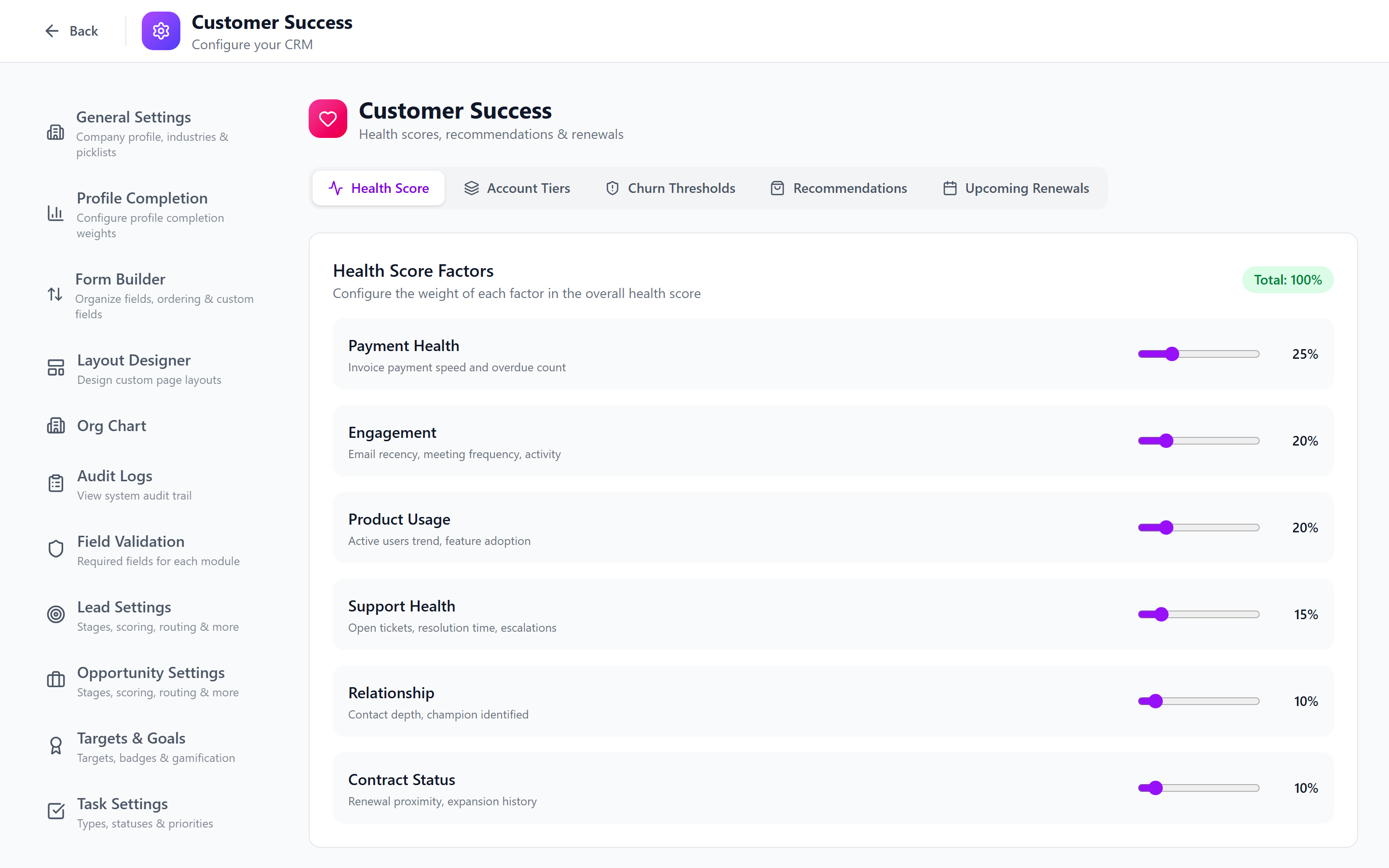
Tab 1: Health Score Configuration
The health score is a weighted composite of 6 factors. This tab lets you control the weight of each factor and set threshold levels.
Configuring Factor Weights
Each factor has a slider from 0 to 100. The total of all weights must equal 100%.
| Factor | Default Weight | What It Measures |
|---|---|---|
| Payment Health | 25% | Invoice payment speed, overdue count |
| Engagement | 20% | Email recency, meeting frequency, login activity |
| Product Usage | 20% | Active user trends, feature adoption, API volume |
| Support Health | 15% | Open tickets, resolution time, escalations |
| Relationship | 10% | Contact depth, champion identified, QBR completed |
| Contract Status | 10% | Renewal proximity, auto-renew, expansion history |
If the weights don't add up to 100%, a warning will appear. The system will not save until the total is exactly 100%.
Setting Thresholds
Two threshold values determine the health label:
- Healthy threshold (default: 70) — scores at or above this are labeled "Healthy"
- At Risk threshold (default: 40) — scores below this are labeled "Critical"
- Scores between the two are labeled "At Risk"
Tunable Churn Signals
The churn signals are now individually tunable — each signal has its own weight and threshold so you can match the model to your actual product / business reality without code changes.
| Signal | Default trigger |
|---|---|
| Payment delays | More than 1 invoice paid late in the last 90 days. |
| Engagement drop | No meaningful engagement in 30 days. |
| Support escalations | More than 2 high-priority tickets in the last 30 days. |
| Usage decline | API / active-user metric down N% from rolling baseline. |
| Champion left | Primary contact's email bounced or contact deactivated. |
For each signal, configure:
- Weight — how much it contributes to the composite churn risk (0–100).
- Threshold — what magnitude triggers it (days, count, percent — varies by signal type).
- Enabled — toggle off signals you can't measure reliably for your product.
The churn-risk recompute runs as part of the hourly scoring cron — changes take effect on the next tick.
How Scores Are Calculated
The system runs a scoring cron job every hour that:
- Evaluates each factor for every account
- Applies the configured weights
- Stores the composite score in the
customer_scorestable - Updates churn risk, CLTV, and upsell scores simultaneously
Tab 2: Product Recommendations
Configure rules that determine which products to suggest as upsell/cross-sell opportunities for each account.
Creating a Recommendation Rule
- Click Add Recommendation.
- Fill in the configuration:
| Field | Description |
|---|---|
| Product | The product to recommend |
| Prerequisites | Products the account must already have (multi-select) |
| Exclusions | Products that disqualify this recommendation (multi-select) |
| Min/Max Company Size | Employee count range for ideal fit |
| Industries | Comma-separated list of ideal industries |
| Base Score | Starting score (0–100) before signals are applied |
| Active | Toggle to enable/disable this rule |
Trigger Signals
Each rule can have multiple trigger signals that boost the recommendation score:
| Signal Type | Example Config | Effect |
|---|---|---|
renewal_within_days | 90 days, weight +20 | Boosts score when renewal is approaching |
revenue_growth_percent | 10%, weight +15 | Boosts when account revenue is growing |
usage_metric_above | Active Users > 50, weight +10 | Boosts when usage exceeds threshold |
subscription_expired | Support Premium, weight +25 | Boosts when a related subscription expired |
Start with 3–5 recommendation rules for your most common upsell paths. Refine the base scores and signals based on actual conversion data over time.
How Recommendations Appear
On each account's 360 view, the top 3 recommendations are shown with:
- Product name
- Composite score
- Human-readable explanation of why
- A Create Opportunity button for one-click action
Tab 3: Upcoming Renewals
A table showing all subscription renewals across all accounts, sortable and filterable.
Columns
| Column | Description |
|---|---|
| Account | The account name (clickable to navigate) |
| Product | The subscribed product |
| MRR | Monthly recurring revenue for this subscription |
| Renewal Date | When the renewal is due |
| Days Left | Color-coded: red (under 30 or overdue), amber (under 90), green (over 90) |
| Auto-Renew | Whether auto-renewal is enabled |
| Owner | The account owner |
Filtering
Use the Days dropdown to filter by timeframe: 30, 60, 90, or 180 days.
This view is especially useful for quarterly business reviews and renewal pipeline planning. Export the data for reports using the standard table export features.
What's Next
- Customer 360 View — how users interact with health scores and upsell suggestions
- Subscriptions & Renewals — managing subscriptions at the account level
- Pipelines & Stages — configuring sales pipelines