Invoices Overview
The Invoices module handles billing — creating invoices, tracking payments, managing line items, and handling the financial side of your customer relationships. Invoices can be generated from opportunities or created standalone.
Invoices Module Overview
Invoices represent billing documents sent to clients for products or services rendered. The module supports the full invoice lifecycle from draft through payment and provides integration with the Xero accounting system.
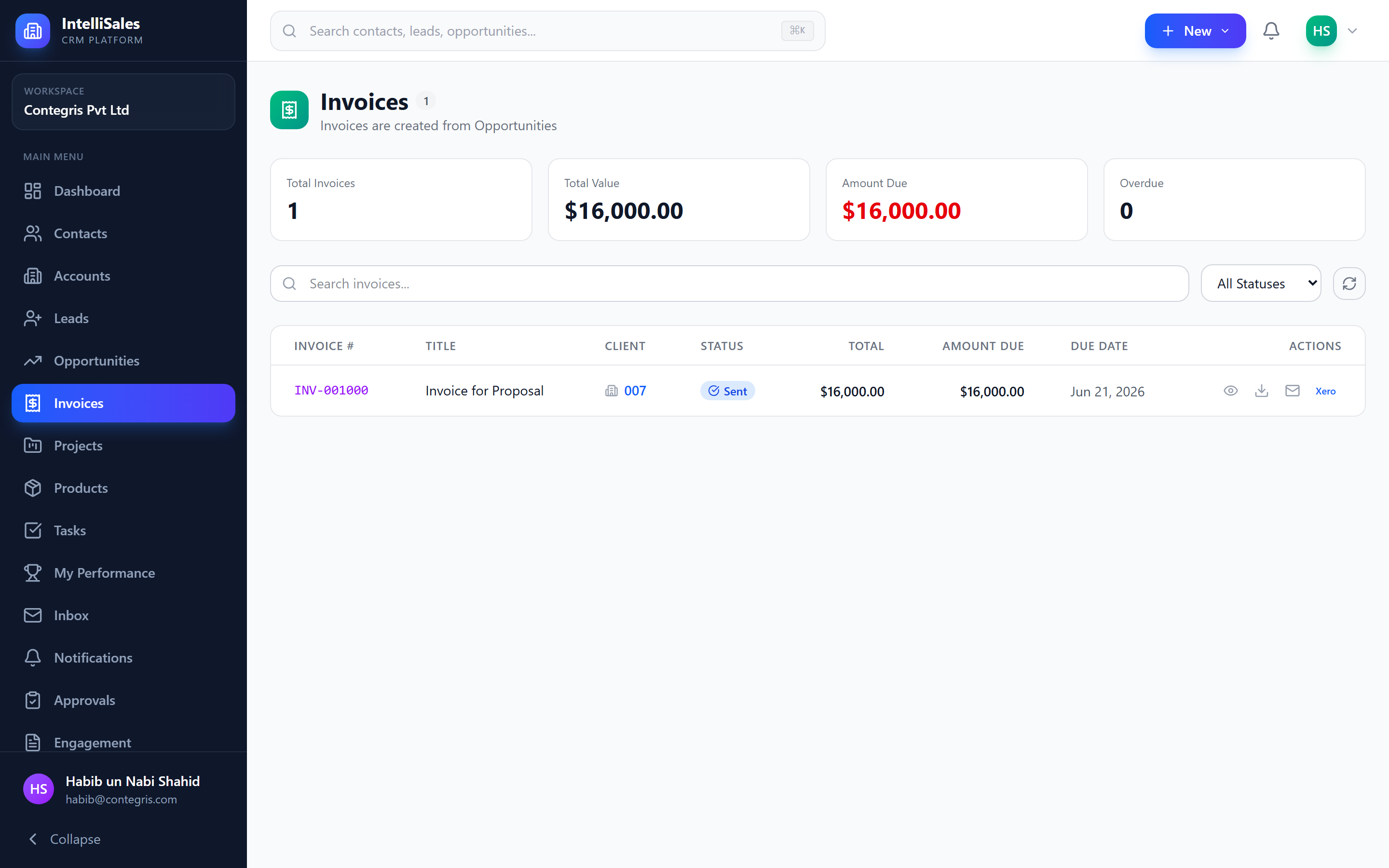
Invoice Statuses
Invoices move through seven statuses during their lifecycle:
| Status | Description |
|---|---|
| Draft | Invoice created but not yet sent to the client |
| Sent | Invoice has been emailed or delivered to the client |
| Partially Paid | Some payment has been received but a balance remains |
| Paid | Invoice is fully paid |
| Overdue | Payment deadline has passed without full payment |
| Cancelled | Invoice has been cancelled before sending (no longer valid) |
| Void | Invoice has been voided after being sent (nullified) |
Status Transitions
The following diagram shows the allowed status transitions:
Draft → Sent → Partially Paid → Paid
  ↓       ↓           ↓
Draft → Cancelled    Overdue → Partially Paid → Paid
  ↓
Sent → Void
| From | To | How |
|---|---|---|
| Draft | Sent | Send the invoice to the client |
| Draft | Cancelled | Cancel the invoice before sending |
| Sent | Partially Paid | Record a partial payment |
| Sent | Paid | Record full payment |
| Sent | Overdue | Automatic when due date passes |
| Sent | Void | Void a sent invoice |
| Partially Paid | Paid | Record remaining payment |
| Partially Paid | Overdue | Automatic when due date passes with balance |
| Overdue | Partially Paid | Record a payment on an overdue invoice |
| Overdue | Paid | Record full payment on an overdue invoice |
Invoice status transitions follow a natural flow: Draft → Sent → Partially Paid/Paid. The Overdue status is automatically applied when a sent or partially paid invoice passes its due date without full payment.
Creating Invoices
From an Opportunity
When managing an opportunity, you can generate an invoice directly:
- Open the opportunity detail page.
- Go to the Invoices tab.
- Click Create Invoice.
- The invoice form pre-populates with:
- Client information from the linked account
- Line items from the opportunity's products
- Amount from the opportunity value
- Review, adjust if needed, and click Save.
Standalone Invoice
- Navigate to Invoices in the sidebar.
- Click + New Invoice.
- Fill in the invoice form manually (see fields below).
- Click Save as Draft.
Invoice Fields
| Field | Description |
|---|---|
| Invoice Number | Unique identifier (auto-generated or manual) |
| Invoice Date | Date the invoice was created |
| Due Date | Payment deadline |
| Client/Account | The organization being billed |
| Contact | The billing contact at the organization |
| Line Items | Products/services with quantities, prices, and discounts |
| Subtotal | Sum of line items before tax and discount |
| Discount | Overall discount (percentage or fixed amount) |
| Tax | Tax amount or rate |
| Total Amount | Final amount due |
| Notes | Additional notes or payment instructions |
| Terms | Payment terms and conditions |
| Status | Current invoice status |
| Linked Opportunity | The opportunity this invoice was generated from |
Line Items
Each line item on an invoice contains:
| Field | Description |
|---|---|
| Product/Description | Select from catalog or enter a custom description |
| Quantity | Number of units |
| Unit Price | Price per unit |
| Discount | Per-line discount — percentage or fixed amount |
| Tax Rate | Tax percentage for this line item |
| Line Total | Calculated: (Quantity x Unit Price) - Discount + Tax |
The invoice subtotal, discount, tax, and total update in real time as you add or modify line items.
Always include clear payment terms and instructions on your invoices. This reduces payment delays and support inquiries about how to pay.
Payments
Record payments as they come in to track the balance owed:
- Open the invoice.
- Click Record Payment.
- Enter the payment details:
| Field | Description |
|---|---|
| Payment Amount | The amount received |
| Payment Date | When the payment was made |
| Payment Method | How the payment was received (see below) |
| Reference Number | Transaction, check, or confirmation number |
Payment Methods
| Method | Description |
|---|---|
| Bank Transfer | Wire transfer or ACH payment |
| Credit Card | Credit or debit card payment |
| Cash | Cash payment |
| Cheque | Paper check payment |
| PayPal | PayPal transaction |
| Stripe | Stripe payment processing |
| Other | Any other payment method |
If the payment is less than the total, the status changes to Partially Paid with the remaining balance displayed. When the total of all payments equals or exceeds the invoice total, the status changes to Paid.
Recurring Invoices
Set up automatic invoice generation on a schedule:
- When creating or editing an invoice, enable the Recurrence toggle.
- Select the recurrence frequency:
| Frequency | Description |
|---|---|
| Weekly | Generate a new invoice every week |
| Monthly | Generate a new invoice every month |
| Quarterly | Generate a new invoice every 3 months |
| Annually | Generate a new invoice every year |
- Set the start date and optionally an end date or number of occurrences.
- Each generated invoice is created as a new Draft and can be reviewed before sending.
Recurring invoices create new draft invoices automatically. You still need to review and send each generated invoice. This gives you a chance to adjust amounts or line items before delivery.
PDF Download
To download an invoice as a PDF:
- Open the invoice.
- Click Download PDF (or the PDF icon).
- A professionally formatted PDF downloads containing all invoice details, line items, totals, and payment terms.
The PDF can be shared with clients, printed, or archived.
Sending Invoices via Email
- Open the invoice (must be in Draft or Sent status).
- Click Send Invoice (or the email icon).
- A compose dialog opens with:
- To — pre-filled with the billing contact's email
- Subject — pre-filled with the invoice number
- Body — a customizable email template
- Attachment — the invoice PDF is auto-attached
- Review and click Send.
The invoice status changes to Sent upon successful delivery.
Xero Integration
If your organization uses Xero for accounting, invoices can be synced:
- Open the invoice.
- Click Push to Xero (available if the integration is configured).
- The invoice is created in your Xero account with all details — line items, amounts, tax, and contact information.
- A sync status indicator shows whether the push was successful.
The Xero integration must be configured by your administrator. Contact your admin if you do not see the Xero option on invoices.
For managing invoices in detail, see Managing Invoices.