Lead Scoring & SLA
IntelliSales CRM provides three mechanisms to help you prioritize and manage leads: Lead Scoring ranks by signal-driven rules, Qualification Score ranks by structured framework answers (BANT / CHAMP), and SLA rules ensure timely follow-up. The two scores are independent engines with separate columns, separate workflow triggers, and separate UI cards — you'll see both on every lead.
Lead Scoring Overview
Lead scoring assigns a numerical score to each lead based on how well it matches your ideal customer profile and engagement criteria. Higher-scoring leads are more likely to convert and should receive priority attention.

How Scores Are Calculated
Scores are calculated using rules configured by your administrator. Each rule evaluates a specific condition and adds or subtracts points:
| Rule Component | Example |
|---|---|
| Field | Industry |
| Condition | equals "Technology" |
| Points | +15 |
| Rule Component | Example |
|---|---|
| Field | Company Size |
| Condition | greater than 100 |
| Points | +10 |
| Rule Component | Example |
|---|---|
| Field | Source |
| Condition | equals "Cold Call" |
| Points | -5 |
Rules are evaluated whenever a lead is created or updated. The total score is the sum of all matching rule point values.
Lead scoring rules are configured by administrators under Admin > Lead Settings > Scoring. If you believe a scoring rule needs adjustment, discuss it with your admin.
Time Decay
Some signals matter more when they're fresh — an inbound demo request from yesterday is a stronger buying intent than the same form fill from six months ago. The scoring engine applies time decay to date-driven signals so they weigh less the older they get. The decay curve is configured in the rule (older_than operator), and the most recent recompute correctly weighs an old signal down rather than treating it as zero. You'll see this on the score breakdown panel as a "decayed by Xpts" annotation on the relevant rule.
Multi-Select Values
Rules that use in or not_in operators on dropdown fields now accept a multi-select value list — so a single rule covers "industry IN (Tech, SaaS, Telco)" instead of needing three rules. Admins maintain this directly in the lead scoring builder.
Qualification Score
Numeric qualification scoring ships with migration 081.
Alongside the rule-based Lead Score, every lead now also carries a Qualification Score computed from the active framework (BANT / CHAMP / custom). It's a structured-answer score, not a signal score:
- Each qualification field has a max weight (the four BANT/CHAMP fields default to 25 each, summing to 100).
- Each dropdown option on each field has its own score between 0 and the field's weight (configured by your admin).
- The lead's total qualification score = sum of matched option scores for single-select fields + sum of all matched options for multi-select fields (capped at the field's weight).
The score updates whenever you change a qualification answer on the lead, when an admin edits the framework's weights / option scores, and when the lead moves stages — so the value on the detail page doesn't go stale after a handoff.
Where you'll see it
- Lead detail page — a second score card next to Lead Score, showing the framework name, a progress bar to 100, and a per-field contribution breakdown (selected option · contribution / weight).
- Lead list — a Qualification column with number + progress bar (same treatment as Score). Sortable by
qualification_score, visible by default. - Reports —
qualification_scoreis a data-source field on leads. Filter, group, aggregate, and use it as a chart axis. - Workflows — admins can build automations on the
lead_qualification_score_changedtrigger, independent fromlead_score_changed.
Viewing Your Lead Score
The lead's score is visible in several places:
- Lead detail page — a score badge in the header area
- Kanban cards — score displayed on each card (if configured)
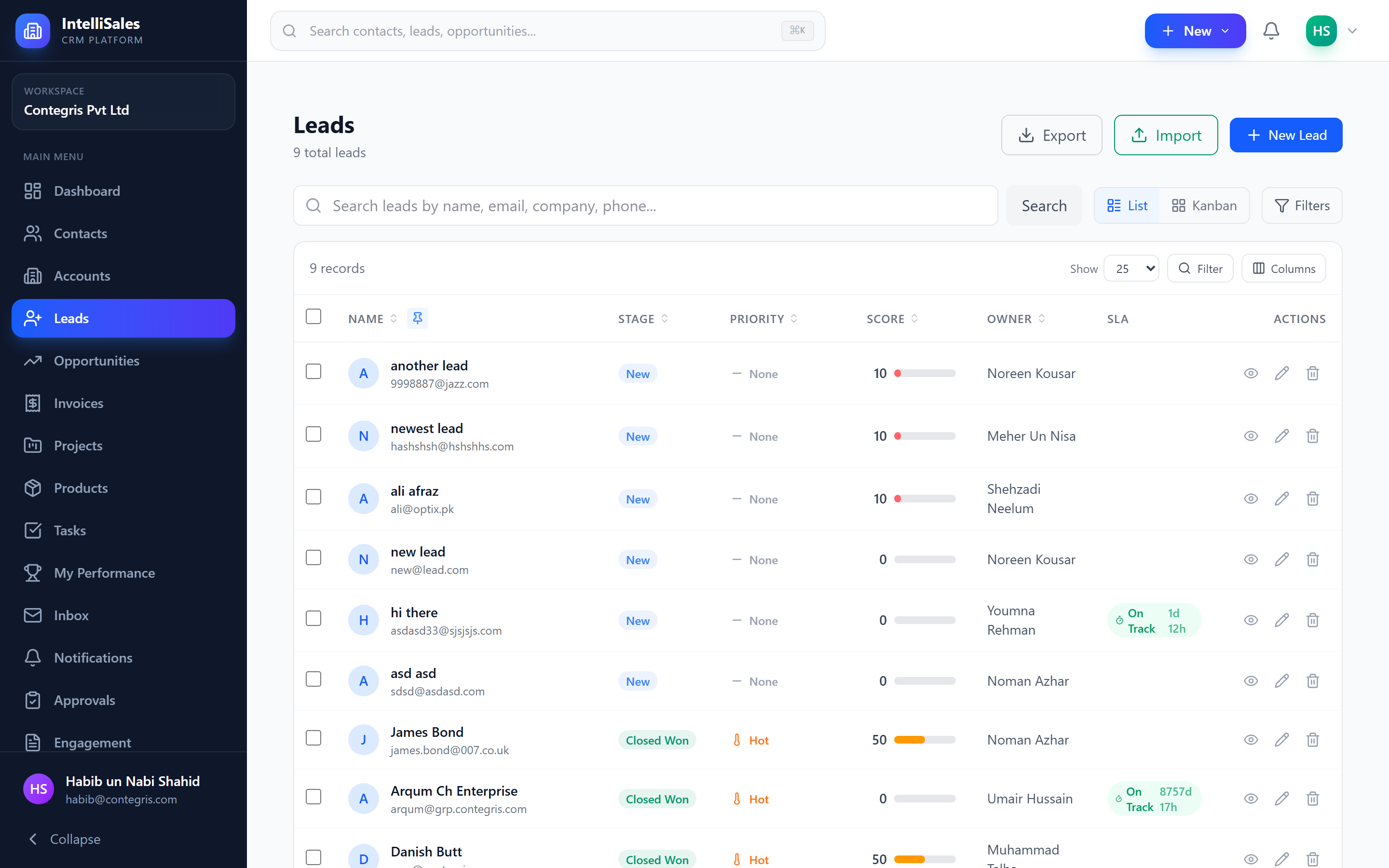
- List view — score column in the data table
- Dashboards — scoring-related widgets
Score Breakdown
On the lead detail page, you can view a score breakdown that lists:
- Each scoring rule that matched the lead
- The points contributed by each rule (positive or negative)
- The total accumulated score
This transparency helps you understand why a lead has a particular score and what changes might improve it.
When working a lead, review the score breakdown to understand what makes it valuable. If a high-scoring lead has specific characteristics (like a large budget or a decision-maker title), tailor your approach accordingly.
SLA Overview
SLA (Service Level Agreement) rules define time limits for responding to and acting on leads. They ensure that no lead sits unattended for too long, which is critical for maintaining prospect engagement.
Common SLA rules:
- First contact deadline — the lead must receive initial outreach within X hours of creation
- Follow-up deadline — after initial contact, follow-up must occur within Y hours
- Stage dwell time — a lead should not stay in a single stage longer than Z days
SLA Indicators
Leads display color-coded SLA status indicators throughout the platform:
| Color | Status | Meaning |
|---|---|---|
| Green | On Track | Plenty of time remaining before the SLA deadline |
| Yellow | Warning | Approaching the SLA deadline — take action soon |
| Red | Breached | The SLA deadline has passed — requires immediate attention |
SLA indicators appear on:
- Lead detail page
- Kanban cards
- List view rows
- Dashboard widgets
SLA Breach Notifications
When a lead's SLA is approaching breach or has been breached, the system can send automated notifications:
- Warning notification — sent when the SLA is nearing its deadline (configurable threshold)
- Breach notification — sent immediately when the SLA deadline passes
- Escalation — breached leads can be escalated to managers automatically
Notifications are sent via the channels configured in your Notification Preferences — in-app, email, SMS, or browser push.
SLA breaches may be tracked in reports and affect performance metrics. Respond to SLA warning notifications promptly to avoid breaches.
SLA Configuration (Admin)
Administrators configure SLA rules under Admin > Lead Settings > SLA. Key settings include:
- First Contact Hours — the maximum time allowed before initial outreach (e.g., 4 hours)
- Working Hours — only business hours count toward the deadline (e.g., 09:00-18:00)
- Working Days — select which days are business days (typically Mon-Fri)
- Timezone — all calculations use this timezone
- Escalation — optionally escalate breached leads after additional hours pass
SLA Status Lifecycle
| Status | Meaning |
|---|---|
| On Track | Plenty of time remaining |
| At Risk | Less than 25% of time remaining |
| Breached | Deadline passed without first contact |
| Escalated | Breach persisted beyond escalation window |
| Met | First contact made within deadline |
| Met Late | First contact made, but after the deadline |
Response Time Tracking
When you log your first activity on a lead (call, email, meeting), the system records:
- The exact timestamp of first contact
- The response time in minutes
- Whether the SLA was met or breached
This data feeds into dashboard reports and can be used in performance reviews.
Working-Hours Cursor Fix
The working-hours calculation used by SLA due dates used to get stuck at the same time-of-day when iterating across non-working days — for some configurations a 4-hour SLA created Friday at 4 PM would re-evaluate at exactly 4 PM the following Monday rather than advancing into Monday morning. This is fixed — the iterator now correctly moves to the start of the next business day before counting remaining hours, so SLAs land on the expected wall-clock time.
To meet SLAs consistently, use the SLA filter on the leads list page to sort by "At Risk" status and prioritize those leads.